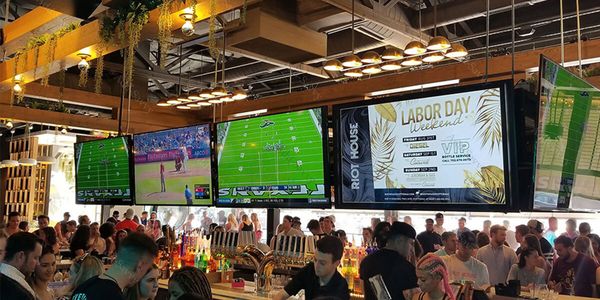
You spend thousands printing seasonal promotional materials, only to throw them away a few weeks later when prices change or inventory runs out. Relying on static, easily outdated posters frustrates both your staff and your customers who rely on accurate information. Upgrading to a digital signage network solves this communication bottleneck by allowing you to instantly update messaging across your entire business floor without touching a piece of paper.
We have already navigated these commercial communication upgrades for countless local businesses. At Main Line Sound & Video, our appliance and electronics experts created this guide to walk you through everything from selecting commercial digital signage displays to building an engaging content strategy.
Explore Commercial Display Solutions
Upgrade your communication strategy with professional digital displays and local expert installation.
Key Takeaways
- Commercial Grade Reliability: Professional screens are built specifically for constant 16/7 or 24/7 use, easily outlasting standard consumer televisions.
- Centralized Control: Cloud-based management systems let you update messaging instantly across one screen or multiple locations from a single dashboard.
- Purpose-Driven Design: The most effective digital signage content strategy relies on clear, highly readable graphics optimized for short 5-to-15-second viewing windows.
What Makes Up a Professional Digital Signage Setup

A professional digital display network involves four core components working in harmony. You need commercial digital signage displays, a media player, a content management system (CMS), and a solid network infrastructure. These pillars combine behind the scenes to power smooth, highly reliable communication.
Consumer-grade monitors simply cannot handle constant commercial demands. Professional displays are engineered with heavy-duty power supplies for continuous 16/7 or 24/7 operation. They also often feature System-on-Chip (SoC) technology, which builds the media player directly into the screen chassis.
Whether you use a hardwired ethernet connection or a wireless setup, a robust cloud-based digital signage CMS pulls the entire system together. This software acts as the brain of your operation, telling your media player exactly what to show and when to show it.
How to Align Business Goals with Your Digital Display Deployment

Strategy must always precede technology selection. Rushing into buying hardware without a communication plan leads to empty screens and wasted budgets. Take time to audit your existing communication channels to identify what information your customers actually need before you make a purchase.
Every commercial display should serve a distinct, predetermined use case. Common retail applications include:
- Promotional displays highlighting daily specials or high-margin products.
- Interactive digital displays that provide intuitive facility wayfinding.
- Corporate communication screens intended for internal employee messaging.
- General brand awareness displays to keep customers engaged while waiting in line.
Once you define your target audiences, determine your deployment scale. Count exactly how many locations and screens you need to cover your footprint. Finally, set measurable performance metrics to track whether your new screens actually improve customer engagement or reduce wait times.
Best Practices for Designing Effective Digital Signage Content

Creating a retail digital signage solutions strategy requires an entirely different approach than print media. Viewers typically only glance at screens for five to fifteen seconds while walking by. Your messaging must remain bold, clear, and easy to read from a distance.
Designing for Quick Comprehension
Strong contrast ratios and properly scaled fonts dictate whether your message lands or gets completely ignored. Never use long paragraphs or dense walls of text on your displays. Keep your digital assets high-resolution, and avoid running slides so quickly that viewers cannot finish reading the main headline.
Advanced Scheduling Techniques
Modern commercial digital signage displays allow for highly targeted scheduling. Dynamic content scheduling lets you run specific promotions at specific times to match foot traffic. For example, dayparting allows a restaurant to automatically switch their digital menu boards from breakfast to lunch items at exactly 11:00 AM. You can also integrate real-time data feeds for local weather or news to keep the screens fresh.
Selecting Commercial Hardware and Evaluating Environmental Factors

Your physical environment dictates what kind of hardware you actually need to buy. You must evaluate ambient lighting conditions and viewing angles to choose a screen with the correct brightness rating. Outdoor digital signage displays require heavy weatherproofing and intense brightness to combat direct sunlight, while indoor screens prioritize rich color accuracy.
When sizing your screens, carefully consider the distance from the viewer and the natural eye-level attention field. You can power these screens using a dedicated external digital signage media player or rely on built-in smart capabilities. External media players typically offer more processing power for complex, multi-screen video walls.
Proper physical maintenance significantly extends the life of your hardware. Our installation experts highly recommend leaving a minimum of two inches of physical clearance around the display chassis to allow proper thermal management and ventilation. You will also need specific cleaning protocols depending on whether your screens use standard glass or protective polycarbonate covers.
Securing and Scaling Your Digital Signage Network

Protecting your network architecture keeps your business data safe and your screens running properly. Commercial displays should always sit on a secure, segmented network protected by a sturdy firewall. This prevents a compromised public-facing screen from granting unauthorized access to your sensitive internal business data.
Multi-location deployments often rely on a wide area network (WAN), whereas a single building might just use a local area network (LAN). As your screen network grows, remote device management becomes vital for operational efficiency. Administrators can manage user permissions, push fresh content, and schedule overnight firmware updates without ever visiting the physical screen location. Always prioritize standard security features like device locking to maintain strict data privacy compliance.
Cloud-Based CMS Versus On-Premise Digital Signage Management Platforms
| Feature | Cloud-Based Digital Signage CMS | On-Premise Platform |
|---|---|---|
| Deployment Flexibility | Systems run on external servers for fast and highly flexible deployment. | Systems run on local hardware requiring dedicated server rack space. |
| Initial Costs | Low initial costs paired with a predictable monthly licensing fee. | High upfront hardware purchasing and initial software licensing expenses. |
| Remote Management | Administrators can update screens from anywhere with an active internet connection. | System access is heavily restricted to the local physical network. |
| Scalability | Easily scales across multiple business locations simply by adding a new software license. | Expanding the network requires significant manual server upgrades and IT labor. |
| Technical Maintenance | The software provider handles all backend code maintenance and security updates. | Internal IT teams must manage all server troubleshooting and maintenance tasks. |
The Pros and Cons of Digital Signage for Modern Businesses
Upgrading to a digital signage hardware and software ecosystem offers incredible communication speed, but it does require a larger upfront investment than traditional print methods. Understanding these trade-offs helps you make a confident, informed decision for your specific commercial environment.
Pros
Instant Updates:
You can push new pricing, promotions, or emergency alerts to every screen on your network simultaneously with a single click.
Reduced Print Waste:
Eliminating paper posters and physical menu boards saves money and significantly lowers your commercial environmental footprint.
Dynamic Engagement:
Moving graphics, animations, and bright videos capture human attention much faster than static printed images.
Targeted Scheduling:
Advanced management software allows you to automatically rotate content based on the time of day or specific audience demographics.
Cons
Higher Initial Investment:
Purchasing commercial-grade displays and dedicated media players requires a notable upfront capital expense.
Technical Maintenance:
Maintaining smooth operation requires consistent software updates and highly reliable network connectivity.
Transform Your Visual Communication Strategy with Main Line Sound & Video
Implementing a robust digital signage network modernizes how you interact with your customers and staff on a daily basis. By matching commercial-grade hardware with a strategic, highly visible content plan, you can deliver the exact right message at exactly the right time.
Shop with Main Line Sound & Video to experience the distinct advantage of a local independent retailer. Our electronics experts provide personalized showroom guidance, professional installation services, and reliable local customer support that big-box stores simply cannot match. Contact us today to upgrade your commercial business communication.
Frequently Asked Questions About Digital Signage
Consumer TVs are designed for brief daily viewing, whereas commercial digital signage displays are built for constant 16/7 or 24/7 continuous operation. Commercial units feature heavier-duty power supplies and enhanced cooling systems to prevent premature hardware failure in demanding environments.
A digital signage content management system works by providing a centralized dashboard where you can design, schedule, and deploy media out to your screens. The software sends these digital instructions over your network directly to the media player connected to your display.
The ideal screen height for retail digital displays places the center of the monitor directly at the average human eye level, roughly 60 to 65 inches from the floor. Viewing distance dictates your overall screen size, requiring a progressively larger display as the viewer moves further away to maintain text legibility.
A professional digital signage system typically costs between $1,000 and $3,000 per screen, factoring in the commercial display, media player, mount, and installation labor. Monthly CMS software licensing and ongoing professional content creation will add recurring operational costs over time.
Yes, digital signage content can be updated remotely across multiple locations using a modern cloud-based content management system. As long as your network of screens remains connected to the internet, an administrator can push instant updates from any web browser in the world.
Commercial digital displays require regular dust removal from the chassis ventilation ports to prevent overheating and routine screen cleaning using non-abrasive microfiber cloths. You must also perform regular software updates to patch security vulnerabilities and maintain highly stable media playback.
Why Trust Main Line Sound & Video?
When it comes to designing and installing home entertainment and smart home systems, trust is essential. Main Line Sound & Video has built a reputation for reliability and expertise throughout the Main Line and surrounding areas. As a family-owned business with over 20 years of experience, they prioritize personalized service, ensuring each system is tailored to your home and lifestyle. Their team of certified professionals uses top-quality products and industry best practices, delivering flawless installations and ongoing support. From initial consultation to system optimization, Main Line Sound & Video combines technical expertise with a commitment to customer satisfaction you can depend on.